עבור לטבלת ההשוואה

המוצר הוסר מרשימת ההשוואה

Schneider
התמונות להמחשה בלבד
משווק מורשה ✅
Dell Technologies Platinum Partner

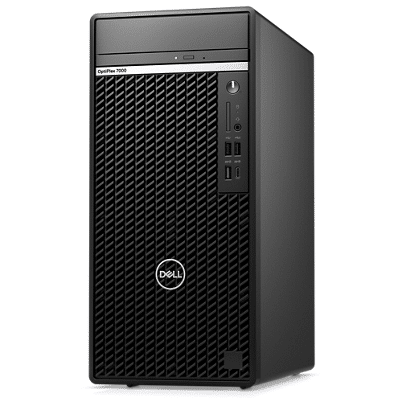
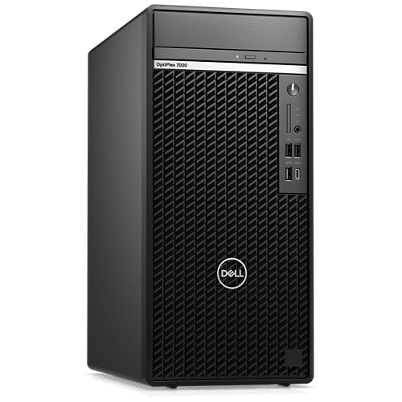
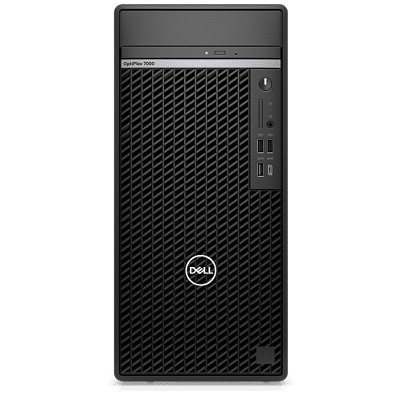
מחשב נייח Dell OptiPlex 7000 Tower OP7000-7024 ללא מערכת הפעלה

התמונות להמחשה בלבד
משווק מורשה ✅
Dell Technologies Platinum Partner
מחשב נייח Dell מסדרת OptiPlex מעבד Intel Core i7, זכרון פנימי בנפח 16GB, אחסון 512GB, מעבד גרפי Intel, מערכת הפעלה ללא מערכת הפעלה ואחריות לשלוש שנים באתר הלקוח ע"י Dell
  • ספק
    CMS, C-DATA
  • מק"ט ספק
    OP-RD33-13645, OP7000-7024

אזל במלאי

ספרו לי כשהמוצר חוזר למלאי

הודעה שנשלחה למייל שלך
אזל המלאי
מק״ט: OP7000-7024

אזל במלאי

ספרו לי כשהמוצר חוזר למלאי

הודעה נשלחה למייל שלכם
מפרט טכני
כללי
  • סוג מוצר

    מחשב נייח

  • יצרן

    Dell

  • משפחה

    OptiPlex

  • דגם

    OptiPlex 7000

מעבד
  • מעבד

    Intel Core i7

  • דגם מעבד

    Intel® Core™ i7-12700 Processor 25M Cache, up to 4.90GHz

  • דור מעבד

    12th Generation

  • ערכת שבבים

    Intel® Q670 Chipset

זכרון פנימי
  • נפח זכרון פנימי

    16GB

  • נפח זכרון מקסימלי

    128GB

  • חריצי זכרון פנויים

    2

  • סוג זכרון

    DDR5-4400

אחסון
  • נפח אחסון

    512GB

  • סוג אחסון

    PCIe NVMe M.2 SSD

  • כונן אופטי

    8x DVD+/-RW 9.5mm Optical Disk Drive

מעבד גרפי
  • דגם מעבד גרפי

    Intel® UHD Graphics 770

תקשורת
  • כרטיס רשת

    Yes

  • Wi-Fi

    No

  • Bluetooth

    No

תכונות נוספות
  • משקל התחלתי

    5.92 kg

תוכנה
  • מערכת הפעלה

    ללא מערכת הפעלה

אחריות
  • תקופת האחריות

    שלוש שנים

  • סוג האחריות

    באתר הלקוח

  • נותן השירות

    Dell

מידע נוסף
  • תוספות למוצר

    260W Power Supply (Bronze)

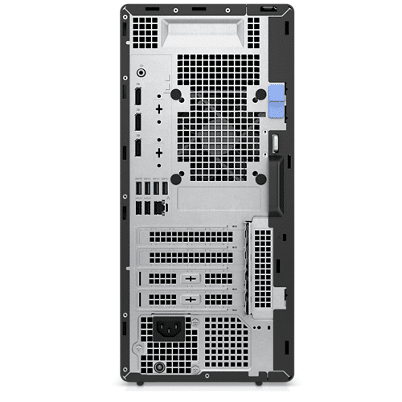
  • חיבורים ויציאות
    Front:
    1 USB 2.0 port with PowerShare
    1 USB 2.0 port
    1 USB 3.2 Gen 2 port
    1 USB 3.2 Gen 2x2 Type-C® port
    1 universal audio jack

    Rear:
    3 USB 3.2 Gen 1 ports
    1 USB 3.2 Gen 2 port
    2 USB 2.0 ports with Smart Power On
    3 DisplayPort 1.4 ports
    1 re-tasking line-out/line-in audio port
    1 RJ45 Ethernet port
  • סוג מארז

    Tower

  • מקלדת ועכבר

    מקלדת ועכבר חוטי

סקירה כללית

Technology that revolves around you

 
Designed around you

Designed around you

The right look: Modern designs allow the OptiPlex 7000 Towers to fit in beautifully in any modern workspace.


Sustainably built: Contains up to 60% post-consumer recycled materials to minimize environmental impact.


Simplify upkeep: Now easier to maintain thanks to tool-less service without removing the bezel.

 
Picture of a Dell OptiPlex 7000 Tower Desktop.

Made to work as hard as you

Powered up: Windows 11 Modern Standby provides an instant on/instant off experience, offering constant connectivity.


Take on any task: Built with 12th Gen Intel® Core™ processors with new Hybrid Core technology to free space for more complex workloads.


Improved VR capabilities: OptiPlex 7000 Towers bring richer views and more engaging VR experience supporting up to NVIDIA® GeForce® 3070.


High-speed access: New Wi-Fi 6E support provides greater network flexibility, faster transfers and reliable connections for secure collaboration.

 
Optiplex Achieve more every day7000 Series Mini-Tower Desktop

Achieve more every day

Increased productivity: Accomplish more with multitasking via DDR5 memory, available on the OptiPlex 7000 Tower, ideal for transitioning smoothly between workload-intense applications.


Broaden your horizons: Intel® 12th Gen integrated graphics with support for up to 4 independent displays.


Next-gen connectivity: Now connect two 4K monitors with the option of a Thunderbolt 4 Add-in Card, available only on the OptiPlex 7000 Tower.

 
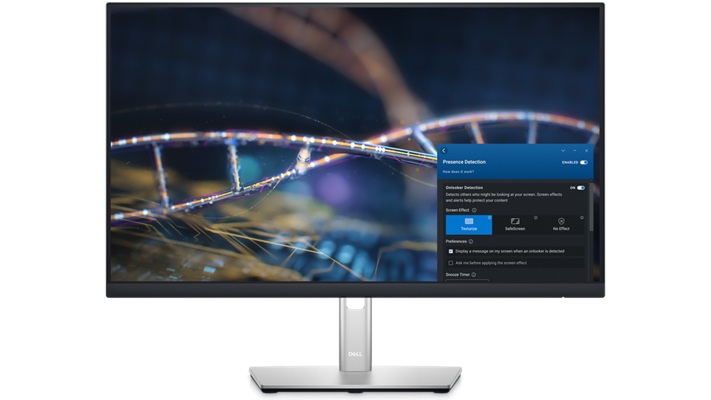
Picture of a Dell monitor with a colorful background and Dell Optimizer tool opened on the toolbar.

Dell Optimizer

Personalized performance with the world’s most intelligent PCs1: Our built-in Artificial Intelligence automatically improves critical areas of your PC in the background, enhancing application performance with adaptive technology from ExpressResponse2.


ExpressConnect: Optimizes conference calls and connectivity so you can work better from anywhere.


Collaborate like you’re there: Intelligent Audio optimizes your sound quality and reduces background noises with automated tuning and neural noise-cancellation, so you can hear and be heard.


Simplified manageability: Optimize your fleet of systems to perform its best with manageability features and productivity gains straight from the Dell Optimizer interface.


Learn more about Dell Optimizer

Eco Labels

Eco-Labels

This product is EPEAT Gold and ENERGY STAR qualified (on select configurations). EPEAT registration varies by country. For specific country participation and rating, please see www.epeat.net.
Products and Packaging

Products and Packaging

Dell Technologies is transitioning to products and packaging made from recycled or renewable resources, and improving products' energy efficiently. We are also working towards reducing our greenhouse gas emissions within our operations and with our direct supply chain partners. Read more about our commitment to sustainability and our 2030 Social Impact goals here.
Carbon Footprint

Carbon Footprint

One of Dell's primary goals is to minimize our environmental impact. We aim to reduce the carbon footprint of our products throughout their lifecycle, from development to recycling and everything in between. Learn more about this product's carbon footprint here.
 
Picture of a smiley man wearing a green shirt and glasses with a headset on his head using a Dell monitor.

Deploy: Our modern deployment solution, ProDeploy in the Unified Workspace allows you to revolutionize the way deployment gets done. By spending just one hour for set up, IT can then hand deployment to Dell and have preconfigured systems shipped directly to the end users wherever they are.


Secure: Dell Endpoint Security for the Unified Workspace helps manage growing cyber risks while embracing workforce transformation. With Dell SafeGuard and Response powered by Secureworks, gain actionable insight to help quickly and efficiently prevent, detect and respond to cyber attacks keeping your environment free from harm.


Manage: We integrated our hardware management solution Dell Client Command Suite with VMware Workspace ONE, allowing you to take advantage of unified endpoint management (UEM) and manage the firmware, operating system and applications for all devices from the Workspace ONE console. UEM simplifies the management of the entire environment saving IT time from having to work between separate consoles for PCs and phones.


Support: ProSupport Plus continues to be the only predictive and proactive support in the market. When compared to key competitors, ProSupport Plus with SupportAssist reduced time to resolve a failed hard drive with up to 11x faster time to resolution3.
 
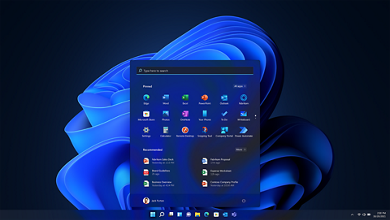
Picture of a laptop homepage with Microsoft Windows 11 blue logo as background and search tool opened.

Windows 11 Pro – designed for hybrid work.The most productive and secure version of Windows yet—but simple for IT.

Learn More
 
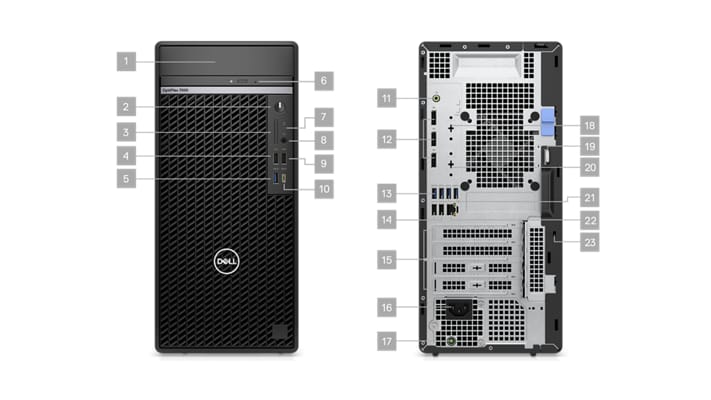
Picture of two Dell OptiPlex 7000 Tower Desktops, one from the front and one from the back and numbers signaling the 23 ports.
 

Ports & Slots – Tower

Front:

1. Hard Drive Disk Cover

2. Power Button

3. SD 4.0 Card Reader (optional)

4. USB 2.0 Port

5. USB 3.2 Gen 2 Port

6. Optical Disk Drive (optional)

7. Hard Disk Drive Activity Light

8. Universal Audio Jack Port

9. USB 2.0 Port with PowerShare

10. USB 3.2 Gen 2×2 Type-C Port

Back:

11. Line-out Re-tasking Line-in Audio Port

12. DisplayPort 1.4 Ports (3)

13. USB 3.2 Gen 2

14. USB 2.0 Ports with Smart Power On (2)

15. Full Height PCIe Expansion (4)

16. Power Connection

17. Power Diagnostic Light

18. Serial/PS2 Port (optional)

19. Padlock Loop

20. Optional video port (HDMI 2.0b/ DisplayPort 1.4a/ VGA/ USB Type-C with DisplayPort Alt mode)

21. USB 3.2 Gen 1 (3)

22. Ethernet RJ-45

23. K-Lock

הערות

* אחריות על שדרוג רכיבים כגון זכרון פנימי או דיסק קשיח תינתן במעבדות שניידר בלבד.

* מחשבים שמגיעים מהיצרן ללא מערכת הפעלה או מערכת הפעלה Linux ההתקנה של Windows הינה באחריות הלקוח בלבד, לא תינתן תמיכה ללקוח שביצע התקנה חלקית או לא נכונה.

* הנתונים נלקחים מאתר היצרן או היבואן ובהתאם להגדרות היצרן לרבות גודל, נפח, מדידה, שיטות בדיקה, תנאי בדיקה, נתונים טכניים וכו’, ט.ל.ח.

* נפח האחסון הפנוי לשימוש נמוך מנפח האחסון הכולל של המכשיר עקב מערכת הפעלה, חלוקה למחיצות, תוכנות אשר מותקנות על ידי היצרן וכו׳.

מוצרים דומים

הסל שלי
אין מוצרים בסל
עמוד הבית
דילוג לתוכן